ASR 语音转文字应用 · 安装部署手册
一、系统要求
| 项目 | 要求 |
|---|---|
| 操作系统 | Linux x86_64(Ubuntu 22.04+ / WSL2 均可) |
| GPU | NVIDIA GPU,Compute Capability ≥ 7.0(推荐 Ampere/Ada Lovelace) |
| NVIDIA 驱动 | ≥ 525.x(支持 CUDA 12.4) |
| 显存 | ≥ 4GB(large-v3-turbo + pyannote 同时加载) |
| 内存 | ≥ 8GB |
| 磁盘 | ≥ 5GB(模型缓存 + conda 环境) |
本手册以 Ubuntu + NVIDIA RTX 3080 为例。
二、安装系统依赖
# 更新系统
sudo apt update && sudo apt upgrade -y

# 安装 ffmpeg(音频处理)和基础工具
sudo apt install -y ffmpeg build-essential curl wget git

# 验证
ffmpeg -version | head -1
nvidia-smi
三、安装 Miniconda
# 下载并安装 Miniconda
wget https://repo.anaconda.com/miniconda/Miniconda3-latest-Linux-x86_64.sh -O /tmp/miniconda.sh
bash /tmp/miniconda.sh -b -p $HOME/miniconda3

# 初始化 conda
$HOME/miniconda3/bin/conda init bash
source ~/.bashrc

# 验证
conda --version
四、创建 Python 3.12 虚拟环境
# 创建环境(使用 conda-forge 频道,避免 MKL 依赖问题)
conda create -n asr python=3.12 -c conda-forge --no-default-packages -y

# 激活环境
conda activate asr

# 验证
python --version  # 应输出 Python 3.12.x
为什么用 Python 3.12? PyTorch cu124 官方提供 cp312 预编译 wheel,Python 3.14 等过新版本无对应 wheel。
五、安装 PyTorch(CUDA 12.4)
# 安装 PyTorch + torchaudio(CUDA 12.4 版本)
pip install torch==2.6.0 torchaudio==2.6.0
    --index-url https://download.pytorch.org/whl/cu124

# 验证 CUDA 可用
python -c "import torch; print(f'torch={torch.__version__}, cuda={torch.cuda.is_available()}, device={torch.cuda.get_device_name(0)}')"
# 应输出: torch=2.6.0+cu124, cuda=True, device=NVIDIA GeForce RTX 3080
如果 PyPI 下载慢,可使用国内镜像:
“`bash
pip install torch==2.6.0 torchaudio==2.6.0
–index-url https://download.pytorch.org/whl/cu124
-i https://mirrors.aliyun.com/pypi/simple/ –trusted-host mirrors.aliyun.com
“`
六、安装 ASR 与说话人分离依赖
6.1 通过 conda-forge 安装(避免编译问题)
conda install -c conda-forge -y
    numpy scipy pandas scikit-learn
    requests safetensors
    av soundfile
    einops optuna
    tokenizers huggingface-hub
    starlette pydantic
6.2 通过 pip 安装核心包
# 使用阿里云镜像加速(pypi.org 在国内可能超时)
PIP_MIRROR="-i https://mirrors.aliyun.com/pypi/simple/ --trusted-host mirrors.aliyun.com"

# CTranslate2(faster-whisper 后端,必须用 pip 版本以支持 Ampere GPU kernel)
pip install --no-deps ctranslate2 $PIP_MIRROR

# faster-whisper
pip install --no-deps faster-whisper $PIP_MIRROR

# onnxruntime(VAD 静音检测用)
pip install onnxruntime $PIP_MIRROR

# FastAPI 相关
pip install --no-deps fastapi uvicorn python-multipart aiofiles annotated-doc $PIP_MIRROR

# pyannote 系列
pip install --no-deps
    pyannote.audio pyannote.core pyannote.database
    pyannote.metrics pyannote.pipeline $PIP_MIRROR

# pyannote 的依赖
pip install --no-deps
    lightning lightning-utilities torchmetrics
    torch-audiomentations torch-pitch-shift
    julius primePy asteroid-filterbanks
    omegaconf antlr4-python3-runtime $PIP_MIRROR

# OpenTelemetry(pyannote 遥测用)
pip install --no-deps
    opentelemetry-api opentelemetry-sdk
    opentelemetry-exporter-otlp-proto-http
    opentelemetry-exporter-otlp-proto-common
    opentelemetry-semantic-conventions $PIP_MIRROR
pip install opentelemetry-exporter-otlp-proto-http $PIP_MIRROR

# sortedcontainers
pip install sortedcontainers $PIP_MIRROR
6.3 验证所有模块可导入
python -c "
import torch; print(f'torch={torch.__version__}, cuda={torch.cuda.is_available()}')
import faster_whisper; print('faster_whisper OK')
import pyannote.audio; print('pyannote.audio OK')
import soundfile; print('soundfile OK')
import fastapi; print('fastapi OK')
import uvicorn; print('uvicorn OK')
import onnxruntime; print('onnxruntime OK')
"
常见问题:
–undefined symbol: iJIT_NotifyEvent→ conda 安装了 MKL 版 numpy,用conda install -c conda-forge nomkl -y切换为 OpenBLAS
–cudaErrorNoKernelImageForDevice→ conda 版 ctranslate2 缺少 Ampere kernel,改用pip install ctranslate2
–No module named 'xxx'→ pyannote 依赖链深,按报错逐个pip install --no-deps xxx
七、配置 HuggingFace Token
pyannote 的模型是 gated(需同意协议),需要 HuggingFace Token:
1. 注册 [huggingface.co](https://huggingface.co) 账号 2. 访问以下三个模型页面并同意协议:
- https://huggingface.co/pyannote/speaker-diarization-3.1
3. 在 https://huggingface.co/settings/tokens 创建 Access Token
# 设置环境变量(写入 ~/.bashrc 持久化)
echo 'export HF_TOKEN="hf_你的token"' >> ~/.bashrc
source ~/.bashrc
八、部署应用代码
8.1 创建项目目录
mkdir -p ~/asr-web/static
cd ~/asr-web
8.2 后端代码 main.py
将项目中的 main.py 复制到 ~/asr-web/main.py。
关键配置项(在文件顶部):
MODEL_NAME = "large-v3-turbo"              # ASR 模型
MODEL_ROOT = "/home/antares/asr-web/models" # 模型缓存目录
HF_TOKEN = os.environ.get("HF_TOKEN", "")   # HuggingFace Token
8.3 前端代码 static/index.html
将项目中的 static/index.html 复制到 ~/asr-web/static/index.html。
8.4 目录结构
~/asr-web/
├── main.py              # FastAPI 后端
├── static/
│   └── index.html       # 前端单页
└── models/              # 模型缓存(自动下载)
    ├── models--mobiuslabsgmbh--faster-whisper-large-v3-turbo/
    ├── pyannote-diarization-3.1/
    └── pyannote-segmentation-3.0/
九、首次启动(下载模型)
首次启动会自动下载模型(约 1.5GB),需要配置 HF 镜像加速:
cd ~/asr-web

# 国内用户使用 hf-mirror.com 镜像
export HF_ENDPOINT=https://hf-mirror.com
export HF_HUB_DISABLE_XET=1
export LD_LIBRARY_PATH=$CONDA_PREFIX/lib:$LD_LIBRARY_PATH

# 启动(首次会下载模型,约 2-5 分钟)
python main.py
看到以下输出表示启动成功:
[ASR] 加载 Whisper 模型 large-v3-turbo -> CUDA float16 ...
[ASR] Whisper 就绪
[ASR] 加载 pyannote/speaker-diarization-3.1 ...
[ASR] pyannote 已移至 GPU: NVIDIA GeForce RTX 3080
[ASR] pyannote 就绪
INFO:     Uvicorn running on http://0.0.0.0:8000 (Press CTRL+C to quit)
十、生产环境部署
10.1 后台启动
cd ~/asr-web

# 设置环境变量
export HF_ENDPOINT=https://hf-mirror.com
export HF_HUB_DISABLE_XET=1
export LD_LIBRARY_PATH=$HOME/miniconda3/envs/asr/lib:$LD_LIBRARY_PATH

# 后台启动
nohup python main.py > /tmp/asr_server.log 2>&1 &

# 查看日志
tail -f /tmp/asr_server.log

# 停止服务
kill $(pgrep -f "main.py")
10.2 使用 systemd(推荐)
sudo tee /etc/systemd/system/asr-web.service > /dev/null <<EOF
[Unit]
Description=ASR Web Application
After=network.target

[Service]
Type=simple
User=$USER
WorkingDirectory=$HOME/asr-web
Environment=HF_ENDPOINT=https://hf-mirror.com
Environment=HF_HUB_DISABLE_XET=1
Environment=HF_TOKEN=hf_你的token
Environment=LD_LIBRARY_PATH=$HOME/miniconda3/envs/asr/lib
ExecStart=$HOME/miniconda3/envs/asr/bin/python $HOME/asr-web/main.py
Restart=always
RestartSec=5

[Install]
WantedBy=multi-user.target
EOF

sudo systemctl daemon-reload
sudo systemctl enable asr-web
sudo systemctl start asr-web
sudo systemctl status asr-web
10.3 Nginx 反向代理(可选)
server {
    listen 80;
    server_name your-domain.com;

    location / {
        proxy_pass http://127.0.0.1:8000;
        proxy_set_header Host $host;
        proxy_set_header X-Real-IP $remote_addr;
    }

    location /ws/stream {
        proxy_pass http://127.0.0.1:8000;
        proxy_http_version 1.1;
        proxy_set_header Upgrade $http_upgrade;
        proxy_set_header Connection "upgrade";
    }
}
十一、使用说明
11.1 访问应用
浏览器打开 http://localhost:8000
11.2 功能说明
| 功能 | 使用方式 |
|---|---|
| 实时录音 | 点击「开始录音」,对着麦克风说话,3秒分段流式识别 |
| 上传文件 | 切换到「上传文件」tab,拖拽或选择音频文件 |
| 说话人数量 | 选择"自动检测"或指定 2-5 人 |
| 提示词 | 输入专有名词(如"徐家汇、贺总"),提高识别准确率 |
| 说话人颜色 | 人物A=蓝色,人物B=绿色,人物C=橙色… |
11.3 API 接口
# 健康检查
curl http://localhost:8000/api/health

# 上传转写
curl -X POST "http://localhost:8000/api/transcribe?num_speakers=2&prompt=徐家汇"
    -F "file=@test.mp3"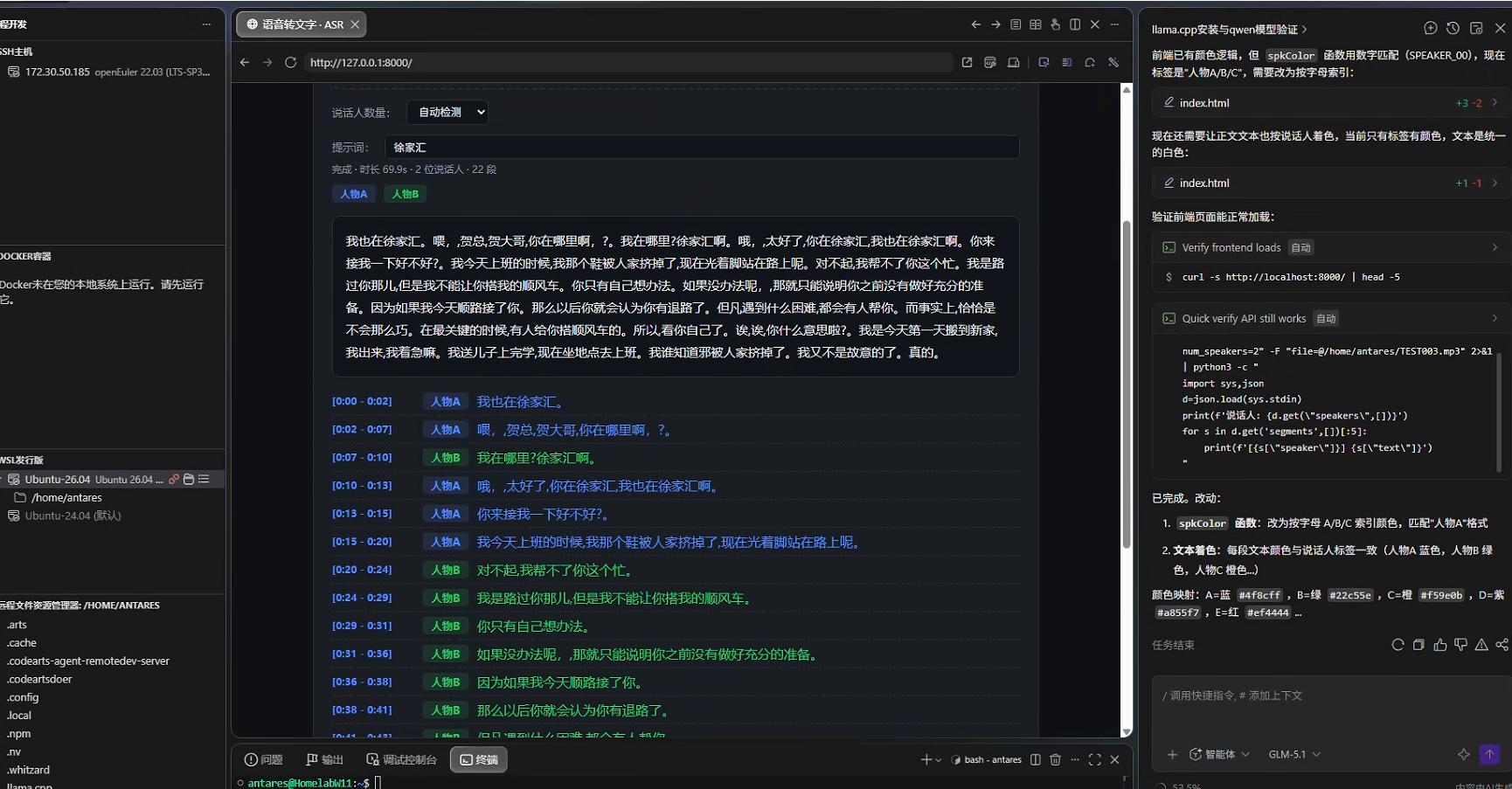
十二、性能参考
| 音频时长 | 处理时间(GPU) | 处理时间(CPU) |
|---|---|---|
| 70 秒 | ~10 秒 | ~48 秒 |
| 10 分钟 | ~60 秒 | ~6 分钟 |
GPU 加速约 4.5 倍,RTX 3080 (20GB) 可轻松处理长音频。
十三、故障排查
13.1 模型下载失败
# 使用 HF 镜像
export HF_ENDPOINT=https://hf-mirror.com
export HF_HUB_DISABLE_XET=1

# 或使用代理
export HTTPS_PROXY=socks5h://代理地址:端口
13.2 CUDA 错误
# 检查 CUDA 可用性
python -c "import torch; print(torch.cuda.is_available())"

# 检查 GPU Compute Capability
python -c "import torch; print(torch.cuda.get_device_capability(0))"
# RTX 30系 = (8, 6), RTX 40系 = (8, 9), 需 cu124 支持

# 确认 LD_LIBRARY_PATH 包含 conda env lib
echo $LD_LIBRARY_PATH
13.3 ctranslate2 cudaErrorNoKernelImageForDevice
conda 安装的 ctranslate2 可能缺少 Ampere kernel,改用 pip 安装:
conda remove -n asr ctranslate2 --force-remove -y
pip install ctranslate2 -i https://mirrors.aliyun.com/pypi/simple/
13.4 pyannote No module named 'xxx'
pyannote 依赖链深,按报错逐个安装:
pip install --no-deps xxx -i https://mirrors.aliyun.com/pypi/simple/13.5 onnxruntime CUDA 冲突
如果 onnxruntime 的 CUDA EP 报错,pip 安装最新版即可:
pip install onnxruntime -i https://mirrors.aliyun.com/pypi/simple/十四、完整依赖版本清单
| 包 | 版本 | 用途 |
|---|---|---|
| torch | 2.6.0+cu124 | 深度学习框架 |
| torchaudio | 2.6.0+cu124 | 音频处理 |
| faster-whisper | 1.2.1 | ASR 引擎 |
| ctranslate2 | 4.8.1 | faster-whisper 后端 |
| pyannote.audio | 4.0.7 | 说话人分离 |
| onnxruntime | 1.28.0 | VAD 静音检测 |
| fastapi | 0.141.1 | Web 框架 |
| uvicorn | 0.52.1 | ASGI 服务器 |
| soundfile | 0.14.0 | 音频读取 |
| ffmpeg (系统) | 8.0+ | 音频格式转换 |
| Python | 3.12.x | 运行时 |
| CUDA | 12.4 | GPU 计算 |